 Keith Bartholomew
A Look Back at my AI Journey in 2025
2025 was a busy year for AI, with huge advancements in the overall ecosystem like the widespread adoption of Model Context Protocol and Agent2Agent and several advancements to the foundation models from most of the major AI players.
Personally, 2025 marked the first year that I truly adopted AI as a core part of how I work, integrating it into my daily processes in both my personal and professional life, and writing LLM-powered code myself. I've been playing around with ChatGPT since it came out in 2023, but you can see how my weekly usage steadily increases during 2025, after being mostly flat the two years prior:
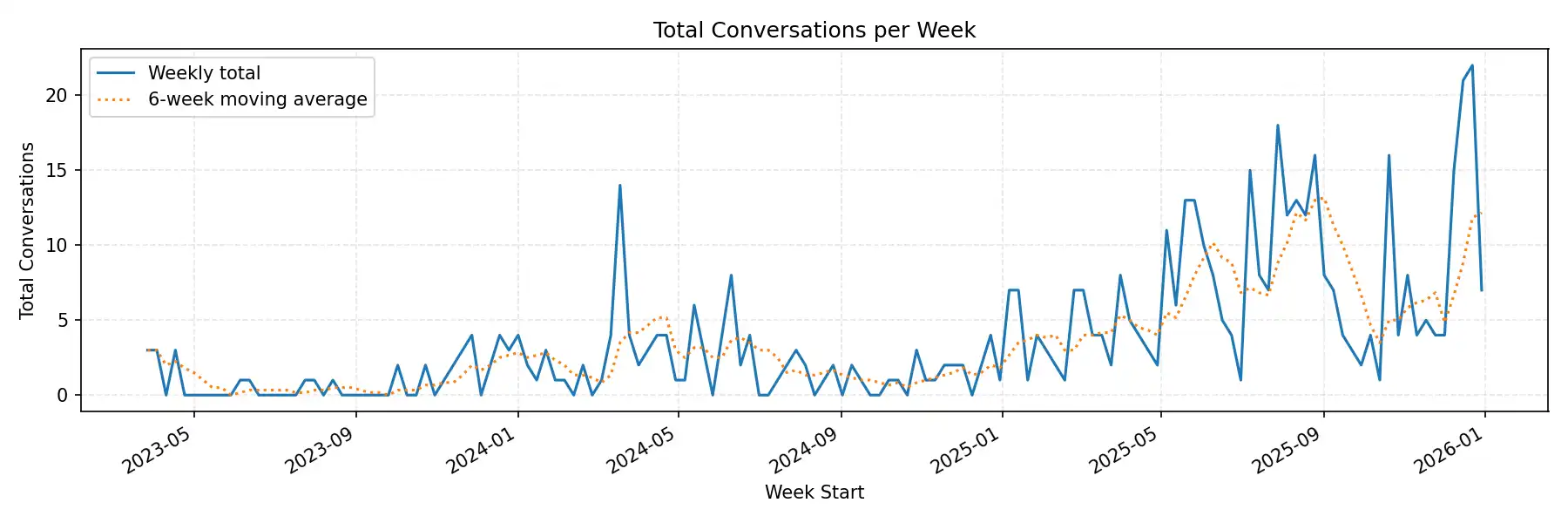
👆 OpenAI Codex made that chart
Beyond just using AI more (which on its own is not necessarily a good thing), how I used AI also changed throughout the year. As I’m writing this there are only 8 hours remaining in 2025, so let’s break it down!
2024: Random Thoughts Machine
Throughout 2024, my use of AI was sporadic, transactional, and pretty inane. I would drop in on ChatGPT with an isolated question about software best practices and then leave. I also spent a considerable amount of time generating silly images with my daughter. At work, we had Copilot licenses for VS Code, so I was very comfortable hitting Tab to complete tedious bits of code. I even got pretty clever (and perhaps ahead of my time) at writing a detailed comment block about some code I wanted to write, then just waiting a few seconds for Copilot to suggest dozens of lines doing exactly what I prescribed.
I wouldn't describe my workflow then as AI-centric, but I was definitely getting comfortable keeping my nameless, faceless AI assistant at a distance and throwing it softball tasks whenever I felt like it could handle them.
Early 2025: Off the Deep End
GoDaddy launched a huge internal initiative to get all of our engineers using AI in their work every day. This didn’t necessarily mean 100% of code was written by AI, but that engineers were leveraging AI at some point of the software process, from design to coding to code review.
To launch this initiative, I gave a talk at an internal “UnConference” that was mostly focused on my AI pet peeve at the time: corporate AI slop. The accessibility of AI tools had reached the non-technical folks, who found it so neat that they could post giant AI-generated “reports” in Slack or play a deeply-hallucinated AI video instead of giving their own presentation. I cautioned my fellow engineers that the reason they were getting paychecks wasn’t their ability to type code, but their ability to understand and solve complex business problems. “Use AI as a tool for your own critical thinking,” I told them. More content is not better, and with content being so easy to come by, editing yourself is more important than ever.
My team and I spent a fair amount of time crafting complex Claude Code slash commands to create a Jira or PRD for a feature, and to automatically review PRs and post comments to GitHub. Both of these ended up being so noisy and error prone that we stopped using them…but live and learn!
The name of the game in the beginning of the year was really to push the limits of vibe-coding in a big tech company world to find the breaking points—we had a running joke of who had more Claude Code sessions running at a single time!
Late 2025: Context Isn’t King—It’s Currency
For a while in the middle of the year, I stopped using Claude Code completely. I had lost some trust in it, and I was being faced with so many deeply-specific and delicate problems that it wasn’t worth my time to let Claude try, only to have to correct or reject it.
But soon, some interesting use cases started cropping up. I had to wade through tons of data, make multiple API calls for each item, analyze the data I got, then do some additional tasks depending on what I saw, and wait for those tasks to finish. It was tedious to do myself, mostly consisted of writing the most horrendous nested loops I have ever touched, and would only need to use once. So if I’m writing “throwaway” code, why bother writing it at all? Why not let Claude write these cursed loops and sift through thousand-line CSVs and call the APIs and do the waiting? What could have been weeks of hell turned into a couple days of letting Claude write some scripts to iterate over a list and methodically execute the plan that I helped it form.
Building Specialized, AI-powered Tools
Earlier in the year, I threw together an MCP server for my deployment platform, and immediately saw both its potential and its limitations. When put into the hands of a capable LLM, it could garner insights in seconds that would take hours of manual investigation by my team. But the only way we could use it was if each engineer configured their MCP-capable local tool to run and use the MCP server. How do we get this power into the hands of all our users with zero effort?
I built a small AI chat interface directly into our developer platform’s UI. Because it's natively part of the application, the UI can send context to the agent about which app or environment a user is currently working with, and uses a variety of tools that run directly in the browser to get additional diagnostic information from the various APIs the user has access to, just by using the browser’s built-in fetch() API. The agent interprets information the user already has access to in the UI, but leverages its knowledge about the platform’s expected behavior to generate truly insightful guidance for our users.
Most importantly, all of the agent’s tools and context-gathering is driven by straightforward JavaScript that runs directly in the browser. Our front-end engineers are able to build and extend the agent’s tools without ever getting into the complexity of MCP, A2A, or other exotic agentic techniques. Making agentic AI accessible to all our engineers has been a huge win.
Ever-Improving Tools
The tools have definitely improved throughout the year, which is probably a big factor in my increasing trust and adoption of them.
Take for example this biblical joke I made about Cain and Abel starting a moving company together. With the tools available at the start of the year, the image is full of the telltale “swirls” of a hallucinating AI, and most of the text is incomprehensible. By the end of the year, the exact same prompt results in much more definition and adherence to the prompt instructions with no obvious errors:
| ChatGPT 4o | ChatGPT 5.2 |
|---|---|
 | 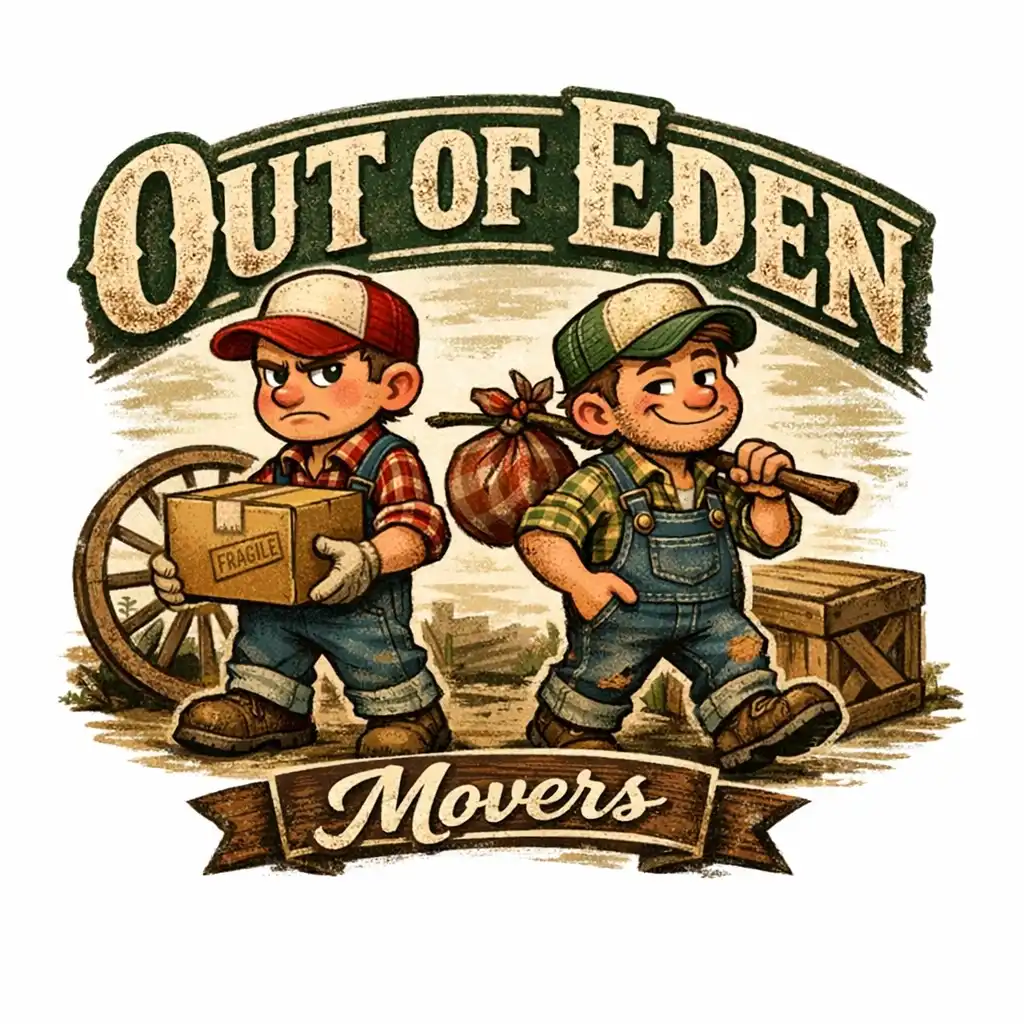 |
Prompt: A rustic and folksy logo for a moving company called 'Out of Eden Movers.' The design features two cartoon mascots who are brothers, each with a slightly contrasting demeanor to suggest they are subtly at odds with one another. One brother appears meticulous and serious, carrying a neatly packed box, while the other is laid-back, holding a slightly askew bundle of belongings. Both wear overalls and trucker hats, with details like plaid shirts and scuffed boots for a rustic charm. The background includes subtle elements like a wagon wheel or wooden crate. The typography is vintage-inspired, with 'Out of Eden' in bold, weathered lettering and 'Movers' in a smaller, complementary script. Earthy tones like deep green, brown, and beige are used to evoke a folksy, trustworthy vibe. | |
Throughout the year, I made a variety of AI-generated riffs on my real headshot to use as my Slack profile picture. Even here, you can see an evolution in quality from the “Studio Ghibli” trope all the way to a photorealistic Christmas card:

My Top AI Use Cases
It's listicle time!
- Coding while walking around. Claude can hold working context while I sit through a meeting or step away from my desk to deal with real life, then pick right back up where we left off. It’s not coding faster — it’s not losing flow when I get interrupted.
- Being the mediator between agents. I intentionally separate “exploration” and “execution” into different agents so doubts, research, and second-guessing don’t poison the main thread. Once I decide, I give the execution agent clear, confident direction and shield it from my own uncertainty.
- Minimal prompts, aggressively managed context. I stopped trying to one-shot everything with massive CLAUDE.md files and started giving tight, task-specific instructions. When the model starts getting overly agreeable or vague, I nuke the context and start fresh.
- Refactor once by hand, then let AI replicate the pattern. Show it the right way once, then delegate the repetition.
- Generate one-off, disposable scripts. Especially cursed bash loops that chew through APIs, CSVs, or logs and will never be run again. Case in point, I used Codex to parse and analyze my exported OpenAI data and generate the plot at the beginning of this post!
- Vibe-code quick-and-dirty analysis tools. Throw together a single-file HTML page to analyze metrics or visualize data without standing up “real” software. When I'm done with my analysis, throw it all away.
- Ask nuanced AWS questions that don’t live in one doc. Limits, edge cases, weird interactions, and “what actually happens when…”.
- Highly personalized exercise, injury, and health guidance. I struggled with a running injury over the summer. In addition to consulting an actual PT, I was able to describe feelings, sensations and nuances of my condition to an AI companion, supplementing my professional medical advice and beating generic internet advice by a mile.
- Hands-free thinking via voice chat. At least ten times while driving this year, I've started a voice chat with ChatGPT, set my phone down, and talked through tech ideas or recipes while stuck in traffic.
- Interactive cooking coach. This is one of my favorites. I had a complex lobster bisque recipe that I had read and studied, but I couldn't keep going back to my laptop or phone to re-read steps, especially with messy hands. So I uploaded the recipe to a ChatGPT conversation and then set my phone in hands-free mode on the countertop. I was able to ask it follow-up questions about the recipe while I worked, getting technique advice and coaching as I went along. Also useful: explaining what the heck “good” risotto is supposed to look and feel like, in plain English.
- Fantasy football advisor. I used it to plan my fantasy football draft, sending it live draft picks and bantering about strategy options. I came in second-to-last place. Take from that what you will.